
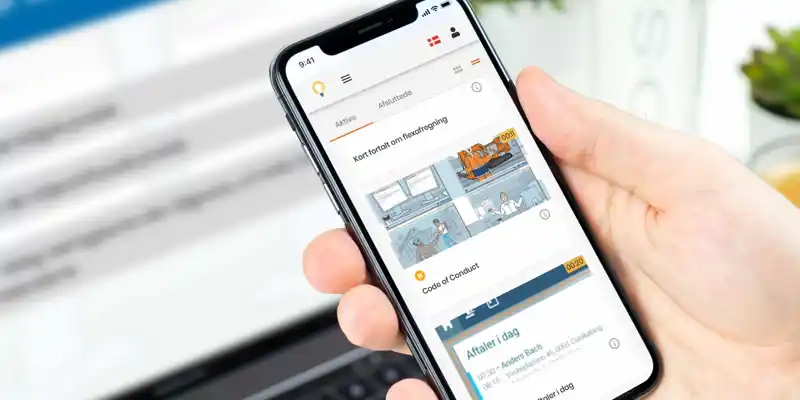
Activate LMS - Learning Management System
Activate LMS is a simple, reliable learning management system with SCORM support, automatic user management, reporting and support included.
"We chose Activate LMS because the system is simple and straightforward to use. We get the help we need, and particularly like features such as automatic user creation, single sign-on and the ability to deliver courses in multiple languages. If you’re looking for an easy-to-understand and efficient LMS solution, we warmly recommend Activate LMS and ElearningSpecialist."
Gregers Pedersen, Head of Group HR, Per Aarsleff A/S
Stop wasting time on administration and technology
We know you'd rather focus on learning and teaching than on the technical side, which is why Activate LMS has a number of automated features:
"We have chosen Activate LMS - Learning Management system because it is simple and straightforward to use, which makes it easy for us to use.
We get the help we need and especially like the features like automatic user creation, single sign-on and, last but not least, the ability to deliver courses in multiple languages. This allows our employees to view the courses in their preferred language.
If you are looking for an easy-to-understand and effective LMS solution, we highly recommend Activate LMS and ElearningSpecialist."
Gregers Pedersen, Head of Group HR at Per Aarsleff A/S.
Case: How Aarsleff got started with e-learning and Activate LMS .
- Automatic creation, editing and deletion of users.
- Automatic assignment of online learning courses based on users' organization and/or job function.
- Automatic sending of emails with course diplomas, information about new courses, or reminders if a user has missed a deadline.
- Automatic recording and reporting of users' results.
There are several other functions that can run completely automatically.
We have created solutions that have run for several years without anyone having to look at them.
Want to see an online demo? Give us a call.
"We have chosen Activate LMS - Learning Management system because it is simple and straightforward to use, which makes it easy for us to use.
We get the help we need and especially like the features like automatic user creation, single sign-on and, last but not least, the ability to deliver courses in multiple languages. This allows our employees to view the courses in their preferred language.
If you are looking for an easy-to-understand and effective LMS solution, we highly recommend Activate LMS and ElearningSpecialist."
Gregers Pedersen, Head of Group HR at Per Aarsleff A/S.
Case: How Aarsleff got started with e-learning and Activate LMS .
Tick the important but a bit boring thing
Reliability is something we take for granted; it just has to work . So let's check off some of the things you probably want answers to now.
- Danish Learning Management System that works on mobile, tablet and computer.
- SCORM compliant and therefore works well with content that you, or others, have produced with Articulate Storyline , Articulate Rise , Adobe Captivate. You can also use ready-made e-learning courses from e.g. Golearn or others.
- Hosted cloud LMS that stores data in the cloud - and has everything under control with Personal Data and GDPR.
- Integration with Active Directory, Azure Entra, etc. so that creating and updating users/students happens automatically.
At the end of this page you will find a list of frequently asked questions - here you can also find answers to the more technical questions.
What makes Activate LMS special?
There are many e-learning platforms out there . But what makes Activate LMS special, besides offering e-learning distribution, tracking, and reporting?
Easy language management in Activate LMS
In Activate LMS it is easy for you to manage courses in multiple languages. You can upload different courses to the same module and simply mark which language they are in - whether it is English, German, Chinese or whatever you need. This also means that the courses can be tailored to each language.
In many other LMS systems, having courses in multiple languages can be a challenge. You either have to create one expensive course that includes all languages, or you have to create many separate courses, which can hinder the development of employee skills. This can often mean extra work in assigning courses to the right people and pulling reports.
"Offering learning in multiple languages increases engagement and ensures that all employees feel included, regardless of their language background."
– Jane Bozarth, from The Learning Hack podcast, Episode 22: "The Importance of Multilingual Support in LMS"
"Offering learning in multiple languages increases engagement and ensures that all employees feel included, regardless of their language background."
– Jane Bozarth, from The Learning Hack podcast, Episode 22: "The Importance of Multilingual Support in LMS"
One platform for all your employees, companies or customers
With Activate LMS you can easily manage e-learning for multiple employees, companies or customers. Each customer gets a personalized experience with their own logo, so it feels like their own platform.
Adaptation to company needs
"Successful learning solutions are about meeting the specific needs of the organization rather than offering a plethora of features that may never be used."
– Clark Quinn, from The e-Learning Brunch podcast, Episode 5: "Choosing the Right LMS for Your Needs"
Adaptation to company needs
"Successful learning solutions are about meeting the specific needs of the organization rather than offering a plethora of features that may never be used."
– Clark Quinn, from The e-Learning Brunch podcast, Episode 5: "Choosing the Right LMS for Your Needs"
Easily update courses with "external" SCORM packages
With external SCORM packages (also called SCORM proxy), your e-learning modules can be displayed in the customer's own LMS, even though they are actually still located in Activate LMS. This means that users cannot see that the content comes from your own LMS, which gives you a few clear advantages:
- Easy content updates: Need to make changes to your e-learning modules? Just upload them into Activate LMS. No need to send new versions to the customer.
- Protect your content: Want to restrict a customer's access to your course? Easily close access directly in Activate LMS.
LMS support is included in the price
Activate LMS is easy to use, but has some advanced features that may require a little extra explanation and help. That's why we include free super user support for our customers. We think that's the most reasonable thing to do. Activate LMS should work for all of our customers - all the time.
We also offer what we call LMS Totalservice. In short, this means that we take care of all the practical aspects, so you don't have to deal with setup, administration, uploading content, setting up emails, running campaigns, configuring reports, etc.
“At Saville Consulting, we were looking for an LMS provider and chose Activate LMS – a choice we are very satisfied with!
Throughout our entire process, we have experienced a towering level of service, where we - and our business context - have been at the center.
The collaboration - and the sparring - has been characterized by didactic understanding both with regard to decisions in the development of our e-learning content and the construction of the technical setup in Activate LMS .
Mattis Noot Ishøy, Saville Consulting Denmark.
“At Saville Consulting, we were looking for an LMS provider and chose Activate LMS – a choice we are very satisfied with!
Throughout our entire process, we have experienced a towering level of service, where we - and our business context - have been at the center.
The collaboration - and the sparring - has been characterized by didactic understanding both with regard to decisions in the development of our e-learning content and the construction of the technical setup in Activate LMS .
Mattis Noot Ishøy, Saville Consulting Denmark.
Quite simply…
Whether you are looking for an LMS for structured and automated onboarding, compliance or product training or just want to assign a single course to all your employees/students/learners, Activate LMS could be the solution for you.
Ready to start?
What do you need an LMS for?
Maybe you've landed on this page because you want to know what an LMS can be used for?
Let's be honest: LMS, or Learning Management System, may not be the most mind-blowing topic in the world. But it's important. If you want e-learning that's easy to distribute to users and easy to manage, then an LMS is essential.

What is SCORM and why is it important?
SCORM is an e-learning standard that ensures that your e-learning is "plug and play", i.e. that you can move your e-learning from one LMS to another, and that you can purchase standard courses.
A significant advantage of SCORM is that it reduces vendor dependency and thus the risk of choosing the wrong vendor. Activate LMS is a SCORM compliant LMS that supports both SCORM 1.2 and SCORM 2004.
Here you can hear Tomas explain about SCORM:

How does an LMS work?
In the LMS you can upload e-learning modules, send messages to users, and decide whether an e-learning course is mandatory or optional for employees. It is also possible to combine several e-learning modules into e-learning courses, in order to group and possibly reuse the same courses for different groups. You can also decide whether it should be automatically assigned to groups of users and much more.
Once you have set up the e-learning content in Activate LMS, it is most common for employees to receive an email notifying them that e-learning is ready for them, after which the employee logs into the LMS via their Smartphone, Tablet or Computer and completes the course.
"Mobile learning is about meeting users where they are and giving them the opportunity to learn when it suits them."
– Connie Malamed, from the podcast The eLearning Coach, Episode 32: "Designing for Mobile Learning"
When employees work with the e-learning, the LMS stores various information, such as their answers to questions and how much time they spent. This is called tracking. Tracking also ensures that employees can resume learning where they last left off in the e-learning course.
You also have the option to see reports on which employees have completed e-learning - and send reminders to those who have not yet completed it. If you do not want the system to do it - completely automatically - for you.
You can read this article in our e-learning blog and learn more about what you should pay attention to when choosing an LMS.
Ease of use and simplicity as core values
"Intuitive design is essential to creating a seamless learning experience where users can focus on the content rather than navigating complex systems."
– Donald H. Taylor, from The Learning Hack podcast, Episode 10: "User-Centered Design in Learning Technologies"
What can Activate LMS NOT do ?
Although Activate LMS has many advantages, we believe it is not suitable for use in a school. It is also not very good for synchronous distance learning, where meetings are held via platforms such as Teams or Zoom. Furthermore, it is not ideal for managing physical courses.
But if you have e-learning that you would like to distribute, track and report on, and want an automatic solution, then Activate LMS is a really good option for an easy solution.
ACTIVATE LMS FAQ
Yes, it takes about 30 minutes in an online meeting. Contact us to arrange more details . Afterwards you can get demo access so you can test Activate LMS yourself.
Yes. You can distribute your compliance e-learning and documents in Activate LMS, create automatic follow-ups to ensure users complete the training, and pull reports that document compliance.
In Microsoft Azure. Data is located in a data center in the Netherlands.
Right here: https://activatelms.zendesk.com/hc/en-us
Basically, we support distribution and tracking of e-learning, automatic updating, and reporting.
You can find a more detailed list of features here: https://activatelms.zendesk.com/hc/en-us/articles/200366341-Basic-feature-overview
SCORM 1.2 and SCORM 2004.
Users can be created in four different ways. The different methods can be combined.
Users can be created…
- automatically via synchronization from e.g. AD
- via a spreadsheet/CSV file. This is especially smart if there are many users
- manually by people with the necessary rights
- Finally, users can be allowed to create their own accounts. This is especially smart if they are external employees, e.g. at suppliers.
Yes. You can open up the possibility for users to register themselves. Many of our customers use this in connection with external users of the system, such as suppliers.
Among other things, you can see:
- Not started, in progress, completed, passed, failed
- Users' answers to questions
- How long the user has spent on an e-learning course.
Danish, English, Icelandic, Greenlandic, Norwegian, Swedish, German, Polish, Chinese, Arabic (UAE), Finnish, French, Greek, Italian, Lithuanian, Russian, Spanish with the option to get more languages.
No. We don't believe in gamified learning platforms (and science backs us up ). Boring content doesn't become exciting just because you get on a highscore list in an LMS. We strongly believe in using games with learning and we would love to help develop gamified e-learning *content*. We think the e-learning platform itself should focus on meeting users at eye level - and on being easy to use.
Yes. Our platform is delivered exclusively as a service (SAAS stands for Software as a Service). This means you don't have to worry about installation, operation and maintenance.
Yes. Our platform is delivered exclusively as a cloud solution.
No. Our system is purely a digital learning platform that can only be used for online learning. You could say it is purely an e- learning management system. But we plan to develop our LMS to also support regular analog teaching with teachers and students, classrooms and all.
It is possible to create quizzes and tests, but for actual e-learning courses with more advanced functionality, we recommend that you use Articulate Storyline or Articulate Rise together with our system.
No, for school use we would probably recommend Canvas LMS or Moodle. (But there are of course other learning management systems than those.)
No. Use Teams, Skype, GotoMeeting, Zoom or similar instead to integrate learning features into your learning system.
Yes. Activate LMS can do many of the same things that eloomi can, but is much cheaper.
Activate LMS supports most newer mobile devices (iPhone, Android, etc.), tablets (iPad and Android), and desktop computers (Windows and MacOS). Activate LMS supports mobile learning both as responsive content (e.g. created with Articulate Rise), and as scaled content developed with Articulate Storyline or Adobe Captivate.
Yes. Activate LMS can be set up to talk to your webshop where you take care of payment etc. After you have received payment, you can give the user access to the e-learning they have purchased via the Activate LMS API. Sold as a custom solution - contact us for a quote.
My question is missing?
How does an LMS work?
In the LMS you can upload e-learning modules, send messages to users, and decide whether an e-learning course is mandatory or optional for employees. It is also possible to combine several e-learning modules into e-learning courses, in order to group and possibly reuse the same courses for different groups. You can also decide whether it should be automatically assigned to groups of users and much more.
Once you have set up the e-learning content in Activate LMS, it is most common for employees to receive an email notifying them that e-learning is ready for them, after which the employee logs into the LMS via their Smartphone, Tablet or Computer and completes the course.
"Mobile learning is about meeting users where they are and giving them the opportunity to learn when it suits them."
– Connie Malamed, from the podcast The eLearning Coach, Episode 32: "Designing for Mobile Learning"
When employees work with the e-learning, the LMS stores various information, such as their answers to questions and how much time they spent. This is called tracking. Tracking also ensures that employees can resume learning where they last left off in the e-learning course.
You also have the option to view reports on which employees have completed e-learning - and send reminders to those who have not yet completed it. If you do not want the system to do it - completely automatically - for you.
You can read this article in our e-learning blog and learn more about what you should pay attention to when choosing an LMS.
Ease of use and simplicity as core values
"Intuitive design is essential to creating a seamless learning experience where users can focus on the content rather than navigating complex systems."
– Donald H. Taylor, from The Learning Hack Podcast, Episode 10: "User-Centered Design in Learning Technologies"
What can Activate LMS NOT do ?
Although Activate LMS has many advantages, we believe it is not suitable for use in a school. It is also not very good for synchronous distance learning, where you have meetings via platforms like Teams or Zoom. Furthermore, it is not ideal for managing physical courses.
But if you have e-learning that you would like to distribute, track and report on, and want an automatic solution, then Activate LMS is a really good option for an easy solution.
ACTIVATE LMS FAQ
How much does Activate LMS cost?
See the price list for Activate LMS.
Can I get a free demo?
Yes, it takes about 30 minutes in an online meeting. Contact us to arrange more details . Afterwards you can get demo access so you can test Activate LMS yourself.
Can Articulate Storyline, Articulate Rise and Adobe Captivate E-learning be run in Activate LMS?
Compliance training, can you use Activate LMS for that?
Yes. You can distribute your compliance e-learning and documents in Activate LMS, create automatic follow-ups to ensure users complete the training, and pull reports that document compliance.
Where are the servers located in Activate LMS?
In Microsoft Azure. Data is located in a data center in the Netherlands.
Where can I find online documentation for Activate LMS?
Right here: https://activatelms.zendesk.com/hc/en-us
What features does Activate LMS have?
Basically, we support distribution and tracking of e-learning, automatic updating, and reporting.
You can find a more detailed list of features here: https://activatelms.zendesk.com/hc/en-us/articles/200366341-Basic-feature-overview
Do you have a GDPR policy?
Yes, here: https://elearningspecialist.com/persondata/
Do you support Single Sign-on?
Yes.
Which SCORM versions are supported?
SCORM 1.2 and SCORM 2004.
How are users created?
Users can be created in four different ways. The different methods can be combined.
Users can be created…
- automatically via synchronization from e.g. AD
- via a spreadsheet/CSV file. This is especially smart if there are many users
- manually by people with the necessary rights
- Finally, users can be allowed to create their own accounts. This is especially smart if they are external employees, e.g. at suppliers.
Can you create and synchronize users from Active Directory?
Yes
Can you create and synchronize users from Azure AD?
Yes
Can you create and synchronize users from Microsoft Office 365?
Yes
Can users be allowed to create their own accounts?
Yes. You can open up the possibility for users to register themselves. Many of our customers use this in connection with external users of the system, such as suppliers.
What can you see in the reports?
Among other things, you can see:
- Not started, in progress, completed, passed, failed
- Users' answers to questions
- How long the user has spent on an e-learning course.
What languages does Activate LMS support?
Danish, English, Icelandic, Greenlandic, Norwegian, Swedish, German, Polish, Chinese, Arabic (UAE), Finnish, French, Greek, Italian, Lithuanian, Russian, Spanish with the option to get more languages.
Does Activate LMS use Gamification?
No. We don't believe in gamified learning platforms (and science backs us up ). Boring content doesn't become exciting just because you get on a highscore list in an LMS. We strongly believe in using games with learning and we would love to help develop gamified e-learning *content*. We think the e-learning platform itself should focus on meeting users at eye level - and on being easy to use.
Is Activate LMS a SAAS learning management system?
Yes. Our platform is delivered exclusively as a service (SAAS stands for Software as a Service). This means you don't have to worry about installation, operation and maintenance.
Is Activate LMS a Cloud-based LMS?
Yes. Our platform is delivered exclusively as a cloud solution.
Is face-to-face teaching supported with teachers and students?
No. Our system is purely a digital learning platform that can only be used for online learning. You could say it is purely an e- learning management system. But we plan to develop our LMS to also support regular analog teaching with teachers and students, classrooms and all.
Is Activate LMS an LCMS? Can you create content in your system?
It is possible to create quizzes and tests, but for actual e-learning courses with more advanced functionality, we recommend that you use Articulate Storyline or Articulate Rise together with our system.
Is Activate LMS suitable for schools?
No, for school use we would probably recommend Canvas LMS or Moodle. (But there are of course other learning management systems than those.)
Can you hold online meetings via Activate LMS?
No. Use Teams, Skype, GotoMeeting, Zoom or similar instead to integrate learning features into your learning system.
Can Activate LMS be used as a cheaper alternative to, for example, eloomi?
Yes. Activate LMS can do many of the same things that eloomi can, but is much cheaper.
Is Activate LMS a mobile LMS and which devices are supported?
Activate LMS supports most newer mobile devices (iPhone, Android, etc.), tablets (iPad and Android), and desktop computers (Windows and MacOS). Activate LMS supports mobile learning both as responsive content (e.g. created with Articulate Rise), and as scaled content developed with Articulate Storyline or Adobe Captivate.
Can you run e-learning courses from other providers, for example Office Courses from GoLearn, in Activate LMS?
Yes
Can you sell e-learning courses in Activate LMS (E-commerce)?
Yes. Activate LMS can be set up to talk to your webshop where you take care of payment etc. After you have received payment, you can give the user access to the e-learning they have purchased via the Activate LMS API. Sold as a custom solution - contact us for a quote.