
Onboarding Studioemployee app
Avoid information overload at onboarding
Onboarding Studio helps new people get going on their own instead of burying them in information. Checklists and short guides show what to do now, who to ask, and what can wait.
It lives as an onboarding website and on the phone. For new employees, new arrivals and patients.
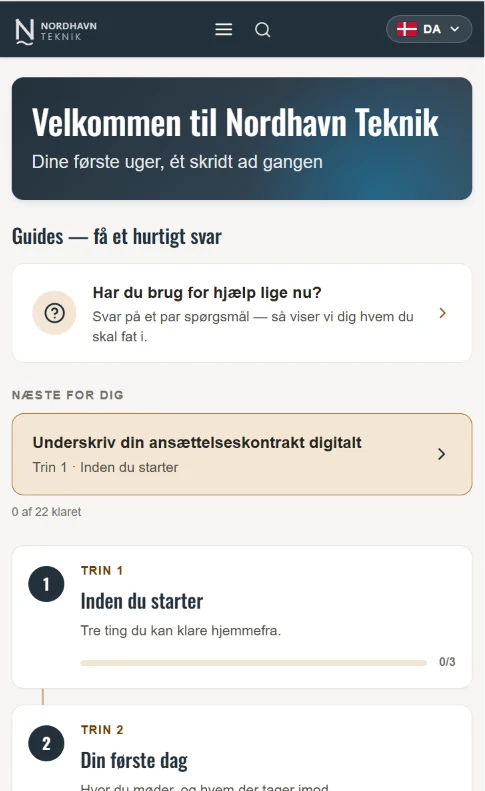 Open the demo (in Danish) →
What a journey looks like
The journey is divided into steps, and you can see how far you have got. Each step shows what has to be done, who to ask, and a short video where showing beats writing.
The principle is borrowed from the patient-journey apps hospitals use. There it is obvious that you cannot tell someone everything on day one: each step arrives when it is relevant. The same holds for a new employee who gets access, pension, holiday and the fire drill in one morning.
One core journey, many workplaces
For organisations with many departments or locations, where some things have to be the same everywhere while each place also has its own content.
HR can run the shared core journey, for instance, while each department maintains its own local contacts, checklists and information. Every place gets its own site and its own QR code, but you share the core journey, the design and the operations.
The specifics go out of date fastest
What people need is the specific: a phone number, a deadline, a link. But the specific is also what goes out of date first. A number changes. A page moves. A form gets a new name.
So the text is made more general: “Contact HR.” “See the intranet.” That rarely goes wrong. But it does not help much either. The price of precision is maintenance. Somebody has to keep an eye on whether the information still holds.
That is what we put monitoring on. The system keeps watch on the links in the journey and says so when one of them stops working. Nobody has to set a reminder in the calendar, and nobody has to review the list twice a year.
If something needs changing, you do it yourself in the editor, and it is on the phone within minutes. Users do not have to update anything, download it again or react to a message. The next time they open it, the text is the new one. That goes for people who started six months ago too.
You are not paying for the app. You are paying for what is in it to be right.
We do not charge per editor or per change. Because the moment somebody thinks “does it cost anything to fix this phone number?”, friction appears. The change gets put off, and suddenly the wrong information stays up to save a fee.
The price therefore follows the number of journeys, not how much you use the tool.
Several languages, one set of content
One journey can run in several languages at once. You pick the language at the top, and everything follows: steps, checklists, contacts and videos.
Change something in the main text, and you can see straight away which other languages need updating.
What does it cost?
All prices are per year, in Danish kroner and excl. VAT.
Separate journeys
If you need one or more self-contained onboarding journeys, for different audiences, departments or purposes.
| What | Price excl. VAT |
|---|---|
| First site | DKK 5,000 / year |
| Site 2 and onwards | DKK 2,500 / year |
Each site is its own journey with its own content and its own QR code.
One shared journey with local variations
For organisations with many departments or locations. Every place gets its own site and its own QR code, but you share the core journey, the design and the operations.
| What | Price excl. VAT |
|---|---|
| First 5 sites | DKK 20,000 / year |
| Site 6 to 25 | DKK 1,500 / year per site |
| Site 26 and onwards | DKK 1,000 / year per site |
The first 5 sites include the shared core journey, your visual identity, the editor, hosting and monitoring.
Example: 25 sites cost DKK 50,000 a year, which is DKK 2,000 per site. Every place can have its own content and its own checklists, and changes come through the next time the app is opened.
Included in the subscription
- Hosting. You do not have to provide a server or involve your IT department.
- The editor. You change texts, checklists and contacts yourself, whenever you like.
- The link monitoring. The system keeps watch on the links in the journey and says so when one of them stops working.
- As many editors as you like. We do not charge per user.
- As many changes as you like. We do not charge per edit.
Available on top
- Setting up your first journey, if you would rather we did it.
- We also build the onboarding journey itself: a welcome video with your own people and short films about the practical things, as described under onboarding of new employees (in Danish).
Fair use: 2 GB of content and 250 GB of traffic a year per site. The limits are set so you do not have to think about them. 250 GB is about 5,000 video views a month.
If you get close, we tell you in good time.
You get started by writing to us. We create your site so you can put in the first journey.
Two things to know before you decide
You can host it yourselves
You get a folder of files to put on your own server. The price is the same, because it follows the number of journeys, not where they sit.
Be aware of one thing: if you do, a change only reaches the user once your IT department has published the new files. If we host, it takes minutes from the moment your editor hits publish.
You decide whether the app measures anything
The standard version sends nothing from the user’s phone: no tracking, no personal data, and so no figures for how many people have seen what.
If you want the figures, we ship the version with measurement instead. It is a choice you make, not a technical limit.
Data processing
The people the journey is for. The app collects nothing, and users have no account. What you tick off or write, the name and number of the person to contact for instance, stays on the phone and is sent nowhere. There are no fields for national ID numbers and no usage statistics. The app fetches neither fonts nor scripts from third parties.
That is the standard version. If you choose the version with measurement, we agree first on what may be measured and write it into the data processing agreement.
Your editors. To let them log in to the editor we store name, email and an encrypted version of the password. The password cannot be read, not by us either.
Where it sits. Everything is processed and stored in the EU: operations and database in Frankfurt, files in Cloudflare’s EU jurisdiction.
First step
Show us the journey you are dealing with
Tell us briefly who has to go through it, and how many languages it has to run in. Then we come back with what it would take.

Or write here
We will get back to you.