What is E-learning? A Complete Guide
Learn what e-learning is, how it works, and why it is an effective form of digital learning for businesses and organizations.
E-learning: What is it?
E-learning. What is it and how do you do it? A thorough introduction to e-learning and digital learning.
E-learning. What is it?
Here you can read what e-learning is and how to develop and use it.
We believe that it is useful to know the process, whether you are looking for an e-learning provider who can create e-learning for you , whether you are looking for a course where you can learn how to create e-learning yourself , or if you just want to learn about e-learning at your own pace ( Elearning blog ).
What is e-learning?
E-learning is digital learning that consists of text, images, audio and video. Often supplemented with interactive tasks and tests and which can be used via a computer, tablet or smartphone.
- no matter where you are
- when you have time for it
- exactly when you need it.
E-learning is especially good if many people need to be trained in the same thing and is typically most relevant if the goal is to create a basic understanding of a topic. This could be, for example, onboarding new employees, training in IT systems and much more.
For companies, the benefits of e-learning typically include training employees:
- Cheaper (Greatly reduced costs on travel, meals, wasted working hours and waiting time)
- More flexible (Access to learning 24/7, no matter where you are, language adaptation of content)
- Faster (Avoid employees wasting time waiting for training, certifications and travel hours)
- that you can document that you have trained your employees.
Compliance E-learning
Elearning is often used in connection with ongoing compliance to ensure that employees are continuously trained.
This is especially in connection with GDPR, IT security, money laundering regulations, anti-corruption, competition regulations, whistleblower scheme, working environment and safety and much more.
It is often also used in connection with the implementation of new policies such as NIS2 and ESG reporting, but it can also be used for very specific topics, everything from managing sick leave to transporting wind turbines.
How do you do e-learning?
There are many roads to Rome – you can convert existing PowerPoint slides into e-learning, or you can design it from scratch. And everything in between.
The following describes how we ourselves do it when we design e-learning.
When we design learning, our starting point is not initially that we are going to make e-learning – the most important thing is to initially make it very clear what need is ultimately to be met. Therefore, the first step is typically to identify the target group and find out where they need to be 'moved';
Who are they? What can they do, and what do they know now? What should they be able to do or know in the long term? What are they doing now? And what do we want them to do? What opportunities and limitations do they have in terms of learning? And how do we best solve the task, with the framework we have?
The answer to these questions is not always e-learning. Sometimes the solution is other forms of digital learning, a short video or online meetings. Other times there is a need to create a blended learning solution, where different learning methods are mixed, for example, supplementing e-learning with regular face-to-face teaching or online education.
If the answer is that e-learning is a good solution to the task, then there are a number of tools you can choose from:
- Will you use storytelling or dialogues to convey knowledge, or will you take a more classic approach with a narrator?
- Do you want interactive tasks?
- Do you want to use gamification for e-learning and create scenarios with dilemmas that the user must decide on?
- Do you want to make small learning games?
- Do you want to have a final test so that you can document that the user has understood the material?
- And many more…
However, it is important to know the target group and how the different tools work on them - paradoxically, unfortunately, there is far too much e-learning that contains elements that actually inhibit the recipients' basis for learning. This is often because the developers do not know how to support the user's motivation for learning.
For example, did you know that there is a big difference between which learning methods work for beginners and experts?
If you use the wrong tools, you risk that the e-learning you have spent time and resources on will become boring and that users will lose motivation to learn.
That's why we work specifically with motivation for learning. You can read about how we do it in our blog article about self-determination theory - the most important theory of learning. (Warning: Long article, so if you can't bear to read 7 pages, it's probably faster to call and get the short version 😊)
E-learning storyboard
Once you have a handle on the target group and the didactic tools, you write a storyboard , which is a kind of script for how the content should be expressed in practice, which is most often done in a program like Word. Once the storyboard is in place, you can begin to design the specific content in an e-learning program, a so-called authoring tool.
Which e-learning programs should you use?
There are a ton of programs out there for developing e-learning. The two best are Articulate Storyline or Articulate Rise , if you ask us. (And we don't own shares in either of them).
It is in Articulate Storyline or Articulate Rise that you work with inserting text, images, audio and video, creating interactive tasks, quizzes and so on.
Articulate Storyline or Articulate Rise are easy to use and easy to learn. Articulate Storyline is the best and most widely used e-learning program in the world, but Articulate Rise also has a number of advantages: It is particularly good for developing mobile e-learning, and Articulate Rise is also an online e-learning platform where you can develop online with others.
When you have finished developing your e-learning course, you need to get it out to the target audience that will use it. You can simply post your courses on a website or an intranet, but if you want documentation, store information about what users have answered questions, and whether they have actually completed the courses you have created, you need to upload your content to an LMS.
LMS is an abbreviation for Learning Management System.
In plain English, an LMS is an online system used to administer e-learning.
The slightly longer description is that an LMS is a learning management system - an online e-learning platform where you can upload and manage your e-learning courses, so you can keep track of how your employees use the digital learning. When employees work with the courses, the LMS stores various information, such as their answers to questions and how long they have spent. This is called tracking , which both makes it possible to verify user activity and aims to ensure that employees can resume learning at exactly the same place they left off.
In the LMS you have the option to see reports on which employees have completed e-learning - and send reminders to those who have not yet completed mandatory content. You can read more about choosing an LMS here.
What is SCORM?
In an LMS, tracking of users' use of e-learning is done using the SCORM standard. Therefore, it is important to ensure that the e-learning programs and platforms you use can save as SCORM.
SCORM is a standard that ensures that your e-learning content and Learning Management System (LMS) can "talk to each other". This means, among other things, that you can move your content to another LMS if you need to change suppliers - without having to pay the box office to have it converted. It also means that you can buy e-learning courses about e.g. Office programs from other suppliers and use them on the same e-learning platform (LMS) as your own e-learning courses. You can read more about SCORM here: SCORM for dummies and busy people .
Fancy technology is not the answer to all learning needs
It may sound banal, but it is important to remember that it is real people who will use e-learning. E-learning and digital learning are smart, and some of the new technological options such as Gamification, Microlearning, and Mobile e-learning have some clear advantages, but it is important not to get too carried away - smart technology should never be an end in itself, but a means to support the knowledge we have about good and motivating learning. Your employees will not be fooled either - people will quickly tire of your e-learning if you pack boring content into a lot of smart technology. The new options must be used with care.
What is Blended Learning?
Blended Learning is about combining different forms of learning – typically through combinations of online learning and “offline” learning. Some things cannot be learned solely by sitting alone in front of a screen. In a number of areas, you need to bring your “body” with you – for example, situations where you need to learn how to handle social interaction, or where you need to practice a specific professional skill, MUS interviews, sales and much more. Of course, you can learn a lot about these topics by reading and listening, but typically you need to practice applying what you have learned in practice.
In these situations, we would typically recommend a Blended learning solution where different learning methods work together.
What is digital learning?
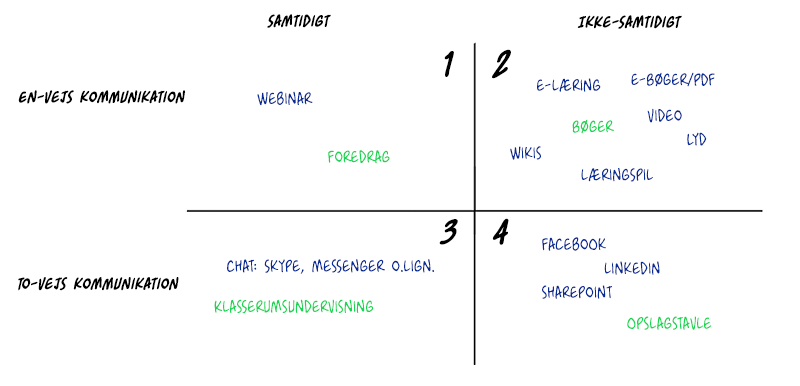
Digital learning means learning that takes place digitally. A Skype meeting or a webinar can be digital learning. Digital learning is an umbrella term for all learning that is in some way connected to something digital.
Course on e-learning
If you are interested in learning more about e-learning, check out our course overview of e-learning courses .
E-learning Blog
Maybe you have more questions?
In our e-learning Blog you will find a wide range of articles about learning, about e-learning tools like Articulate Storyline , and articles about motivation for learning, especially the self-determination theory - the most important theory of learning .
You may also be looking for a supplier to help you with e-learning?
If the answer is yes, then read on….
E-learning supplier with 20 years of experience
At Elearning Specialist we create digital learning experiences for ambitious companies. And we are a bunch of dedicated learning geeks. Our work is based on the latest research and knowledge within learning, combined with our 20 years of experience with e-learning and digital learning.
We work with companies all over the world - primarily in Denmark, but also around Europe, the USA and have even carried out an assignment for the EU in China.
Our customers say that we are good at understanding which companies we work with and translating that into good e-learning – all at a reasonable price.
Here you can read more about how we work.





We can help you get started with e-learning
We have 20 years of experience in developing e-learning and other digital learning for our customers.
We offer
- development of e-learning that suits your needs
- mobile-friendly Danish e-learning platform (LMS) - which doesn't cost the tip of a jet fighter...
- e-learning course - where you can learn how to develop e-learning courses yourself
- ready-made e-learning courses on IT security, Office, management, etc.
- advice on digital - and completely old-fashioned - learning.
But “How long does it take to develop e-learning?”
and
“What does e-learning cost?”
The answer to both questions depends entirely on the project (sorry for the consultant talk, but it does).
Let's turn it around: How much does it cost to have an external trainer train employees? Or hold internal workshops a few times a year? It adds up quickly. And so it's smarter to create a digital learning experience that is available when the employee needs it – and can be used again and again, month after month.
Developing e-learning is an investment here and now, but it pays for itself many times over. You can also ask what it costs your company that a given employee cannot do her job because she is waiting to receive the training or education she needs.
We have written about the topic in our blog if you would like a more in-depth answer to the questions ( How long does it take to create e-learning? and How much does it cost to develop e-learning ?), but the bottom line is that it depends on what you need done.
My best bet is to grab the bone and call us, and we'll give you an estimate.
My question is not here?
Oops. Send us an email or give us a call and we will answer your question shortly.
E-learning. What is it?
Here you can read what e-learning is and how to develop and use it.
We believe that it is useful to know the process, whether you are looking for an e-learning provider who can create e-learning for you , whether you are looking for a course where you can learn how to create e-learning yourself , or if you just want to learn about e-learning at your own pace ( Elearning blog ).
What is e-learning?
E-learning is digital learning that consists of text, images, audio and video. Often supplemented with interactive tasks and tests and which can be used via a computer, tablet or smartphone.
- no matter where you are
- when you have time for it
- exactly when you need it.
E-learning is especially good if many people need to be trained in the same thing and is typically most relevant if the goal is to create a basic understanding of a topic. This could be, for example, onboarding new employees, training in IT systems and much more.
For companies, the benefits of e-learning typically include training employees:
- Cheaper (Greatly reduced costs on travel, meals, wasted working hours and waiting time)
- More flexible (Access to learning 24/7, no matter where you are, language adaptation of content)
- Faster (Avoid employees wasting time waiting for training, certifications and travel hours)
- that you can document that you have trained your employees.
Compliance E-learning
Elearning is often used in connection with ongoing compliance to ensure that employees are continuously trained.
This is especially in connection with GDPR, IT security, money laundering regulations, anti-corruption, competition regulations, whistleblower scheme, working environment and safety and much more.
It is often also used in connection with the implementation of new policies such as NIS2 and ESG reporting, but it can also be used for very specific topics, everything from managing sick leave to transporting wind turbines.
How do you do e-learning?
There are many roads to Rome – you can convert existing PowerPoint slides into e-learning, or you can design it from scratch. And everything in between.
The following describes how we ourselves do it when we design e-learning.
When we design learning, our starting point is not initially that we are going to make e-learning – the most important thing is to initially make it very clear what need is ultimately to be met. Therefore, the first step is typically to identify the target group and find out where they need to be 'moved';
Who are they? What can they do, and what do they know now? What should they be able to do or know in the long term? What are they doing now? And what do we want them to do? What opportunities and limitations do they have in terms of learning? And how do we best solve the task, with the framework we have?
The answer to these questions is not always e-learning. Sometimes the solution is other forms of digital learning, a short video or online meetings. Other times there is a need to create a blended learning solution, where different learning methods are mixed, for example, supplementing e-learning with regular face-to-face teaching or online education.
If the answer is that e-learning is a good solution to the task, then there are a number of tools you can choose from:
- Will you use storytelling or dialogues to convey knowledge, or will you take a more classic approach with a narrator?
- Do you want interactive tasks?
- Do you want to use gamification for e-learning and create scenarios with dilemmas that the user must decide on?
- Do you want to make small learning games?
- Do you want to have a final test so that you can document that the user has understood the material?
- And many more…
However, it is important to know the target group and how the different tools work on them - paradoxically, unfortunately, there is far too much e-learning that contains elements that actually inhibit the recipients' basis for learning. This is often because the developers do not know how to support the user's motivation for learning.
For example, did you know that there is a big difference between which learning methods work for beginners and experts?
If you use the wrong tools, you risk that the e-learning you have spent time and resources on will become boring and that users will lose motivation to learn.
That's why we work specifically with motivation for learning. You can read about how we do it in our blog article about self-determination theory - the most important theory of learning. (Warning: Long article, so if you can't bear to read 7 pages, it's probably faster to call and get the short version 😊)
E-learning storyboard
Once you have a handle on the target group and the didactic tools, you write a storyboard , which is a kind of script for how the content should be expressed in practice, which is most often done in a program like Word. Once the storyboard is in place, you can begin to design the specific content in an e-learning program, a so-called authoring tool.
Which e-learning programs should you use?
There are a ton of programs out there for developing e-learning. The two best are Articulate Storyline or Articulate Rise , if you ask us. (And we don't own shares in either of them).
It is in Articulate Storyline or Articulate Rise that you work with inserting text, images, audio and video, creating interactive tasks, quizzes and so on.
Articulate Storyline or Articulate Rise are easy to use and easy to learn. Articulate Storyline is the best and most widely used e-learning program in the world, but Articulate Rise also has a number of advantages: It is particularly good for developing mobile e-learning, and Articulate Rise is also an online e-learning platform where you can develop online with others.
When you have finished developing your e-learning course, you need to get it out to the target audience that will use it. You can simply post your courses on a website or an intranet, but if you want documentation, store information about what users have answered questions, and whether they have actually completed the courses you have created, you need to upload your content to an LMS.
LMS is an abbreviation for Learning Management System.
In plain English, an LMS is an online system used to administer e-learning.
The slightly longer description is that an LMS is a learning management system - an online e-learning platform where you can upload and manage your e-learning courses, so you can keep track of how your employees use the digital learning. When employees work with the courses, the LMS stores various information, such as their answers to questions and how long they have spent. This is called tracking , which both makes it possible to verify user activity and aims to ensure that employees can resume learning at exactly the same place they left off.
In the LMS you have the option to see reports on which employees have completed e-learning - and send reminders to those who have not yet completed mandatory content. You can read more about choosing an LMS here.
What is SCORM?
In an LMS, tracking of users' use of e-learning is done using the SCORM standard. Therefore, it is important to ensure that the e-learning programs and platforms you use can save as SCORM.
SCORM is a standard that ensures that your e-learning content and Learning Management System (LMS) can "talk to each other". This means, among other things, that you can move your content to another LMS if you need to change suppliers - without having to pay the box office to have it converted. It also means that you can buy e-learning courses about e.g. Office programs from other suppliers and use them on the same e-learning platform (LMS) as your own e-learning courses. You can read more about SCORM here: SCORM for dummies and busy people .
Fancy technology is not the answer to all learning needs
It may sound banal, but it is important to remember that it is real people who will use e-learning. E-learning and digital learning are smart, and some of the new technological options such as Gamification, Microlearning, and Mobile e-learning have some clear advantages, but it is important not to get too carried away - smart technology should never be an end in itself, but a means to support the knowledge we have about good and motivating learning. Your employees will not be fooled either - people will quickly tire of your e-learning if you pack boring content into a lot of smart technology. The new options must be used with care.
What is Blended Learning?
Blended Learning is about combining different forms of learning – typically through combinations of online learning and “offline” learning. Some things cannot be learned solely by sitting alone in front of a screen. In a number of areas, you need to bring your “body” with you – for example, situations where you need to learn how to handle social interaction, or where you need to practice a specific professional skill, MUS interviews, sales and much more. Of course, you can learn a lot about these topics by reading and listening, but typically you need to practice applying what you have learned in practice.
In these situations, we would typically recommend a Blended learning solution where different learning methods work together.
What is digital learning?
Digital learning means learning that takes place digitally. A Skype meeting or a webinar can be digital learning. Digital learning is an umbrella term for all learning that is in some way connected to something digital.
E-learning course
If you are interested in learning more about e-learning, check out our course overview of e-learning courses .
E-learning Blog
Maybe you have more questions?
In our e-learning Blog you will find a wide range of articles about learning, about e-learning tools like Articulate Storyline , and articles about motivation for learning, especially the self-determination theory - the most important theory of learning .
You may also be looking for a supplier to help you with e-learning?
If the answer is yes, then read on….
E-learning supplier with 20 years of experience
At Elearning Specialist we create digital learning experiences for ambitious companies. And we are a bunch of dedicated learning geeks. Our work is based on the latest research and knowledge within learning, combined with our 20 years of experience with e-learning and digital learning.
We work with companies all over the world - primarily in Denmark, but also around Europe, the USA and have even carried out an assignment for the EU in China.
Our customers say that we are good at understanding which companies we work with and translating that into good e-learning – all at a reasonable price.
Here you can read more about how we work.
We can help you get started with e-learning
We have 20 years of experience in developing e-learning and other digital learning for our customers.
We offer
- development of e-learning that suits your needs
- mobile-friendly Danish e-learning platform (LMS) - which doesn't cost the tip of a jet fighter...
- e-learning course - where you can learn how to develop e-learning courses yourself
- ready-made e-learning courses on IT security, Office, management, etc.
- advice on digital - and completely old-fashioned - learning.
But “How long does it take to develop e-learning?”
and
“How much does e-learning cost?”
The answer to both questions depends entirely on the project (sorry for the consultant talk, but it does).
Let's turn it around: How much does it cost to have an external trainer train employees? Or hold internal workshops a few times a year? It adds up quickly. And so it's smarter to create a digital learning experience that is available when the employee needs it – and can be used again and again, month after month.
Developing e-learning is an investment here and now, but it pays for itself many times over. You can also ask what it costs your company that a given employee cannot do her job because she is waiting to receive the training or education she needs.
We have written about the topic in our blog if you would like a more in-depth answer to the questions ( How long does it take to create e-learning? and How much does it cost to develop e-learning ?), but the bottom line is that it depends on what you need done.
My best bet is to grab the bone and call us, and we'll give you an estimate.
My question is not here?
Oops. Send us an email or give us a call and we will answer your question shortly.